
Support.cc
Support.cc
FeaturesPricingContact
Features

Everything in one workspace

From the first customer email to resolution — ticketing, AI, knowledge, and insights built for modern support teams.

No credit card required·Live in 4 minutes·Free plan included
AI & Automation

Drafts, routing & rules on autopilot

The agent reads, classifies, drafts, and routes every message — your team stays in control.

AI drafts that sound like you

On-brand replies grounded in your knowledge base and past resolved threads.

84% auto-resolved42s avg reply
HumanAI

Two response modes

Human — AI drafts, your team approves — or AI autonomous send, per mailbox.

Smart classification

Category, urgency, sentiment, summary, spam score, and importance — auto-tagged on every email.

Auto-routing & forwarding

Sorts mail into the right lane and forwards to the right alias, with a confidence score.

AI-suggested lanes

Tell it your industry; it proposes the support categories to start with.

Auto-responder

Instant branded acknowledgements with template variables, scoped per lane.

Rules engine, auto-close & filters

Plain-language and structured rules, agent-proposed rules from patterns it spots, auto-close, and an ignore list for noise.

EN文

Multilingual replies

Detects the customer's language and drafts the reply in the same language.

Ticket → help article

Generate a publishable KB article straight from a resolved conversation.

Shared Inbox & Ticketing

Every conversation in one place

Board and list views, custom lanes, and business-hours-aware SLA timers keep nothing slipping.

One shared inbox for everything

Board (swim-lane) and list views, custom lanes, and business-hours-aware SLA badges keep every conversation moving.

Lanes & SLA tracking

Custom lanes with live counts and on-track / due-soon / breached badges; timers pause outside hours.

Merge, dedup & linking

Thread merge, duplicate detection, and linking keep related conversations together.

Bulk actions & starred

Act on many threads at once and star the ones that matter.

Rich-text replies

Formatting, links, images, and attachments in every reply.

Search

Across every conversation and contact.

Knowledge & Help Center

A help center that trains your AI

Publish white-label articles on your own domain — every one also teaches the agent, no extra step.

A help center on your own domain

A white-label, hosted help center with categories — and every article also trains your AI agent.

EN文

Custom domain

Bring your own domain with automatic HTTPS, e.g. help.yourbrand.com.

Full branding control

Logo, favicon, colors, hero text, card styles, and light/dark/system theme.

Train on your site & docs

Crawl your website, add webpages, paste custom text, or upload PDFs — with live progress.

Articles train the AI

Every article you publish is synced into the agent's knowledge — no extra step.

Article feedback

Thumbs up/down from readers on every published article.

HumanAI

Draft / publish workflow

Draft, review, and publish — with bulk article management.

Free & Pro accuracy tiers

Choose the retrieval-quality tier — and try the agent before you sign up.

Channels & Integrations

Works with your inbox

Connect any mailbox and reply from your own domain — plus the apps your team already uses.

Connect any support inbox

Gmail, Workspace, Outlook, Microsoft 365, Apple Mail, IMAP/SMTP, or forwarding — and reply from your own domain.

Reply from your domain

Customers see your address — send outbound via SMTP, Amazon SES, or SendGrid.

Multiple mailboxes & brands

Run several mailboxes or brands under one account.

App connectors

Stripe, Shopify, and Agile CRM, plus a general OAuth connection manager.

Contacts & Analytics

Know your customers and your numbers

A lightweight CRM plus a live dashboard for volume, resolution, and CSAT — exportable to CSV.

Insights & contacts in one place

A live dashboard for total emails, AI replies, needs-attention, and SLA compliance — plus contact profiles with full history.

Contacts CRM

Profiles with multiple emails, company, phone, full history, notes, and merge.

Charts & CSV export

First-response and resolution-time charts, period-over-period trends, and CSV export.

CSAT

A single-question post-resolution survey with a satisfaction score.

4-minute setup

A guided wizard gets you live in minutes — try the agent before you sign up.

How it works

How Support.cc works in detail

Six capabilities, explained for buyers, ops leads, and engineers deciding whether Support.cc fits the stack.

01Lanes, SLAs, and a triage UX that learns

How does Support.cc handle ticket triage?
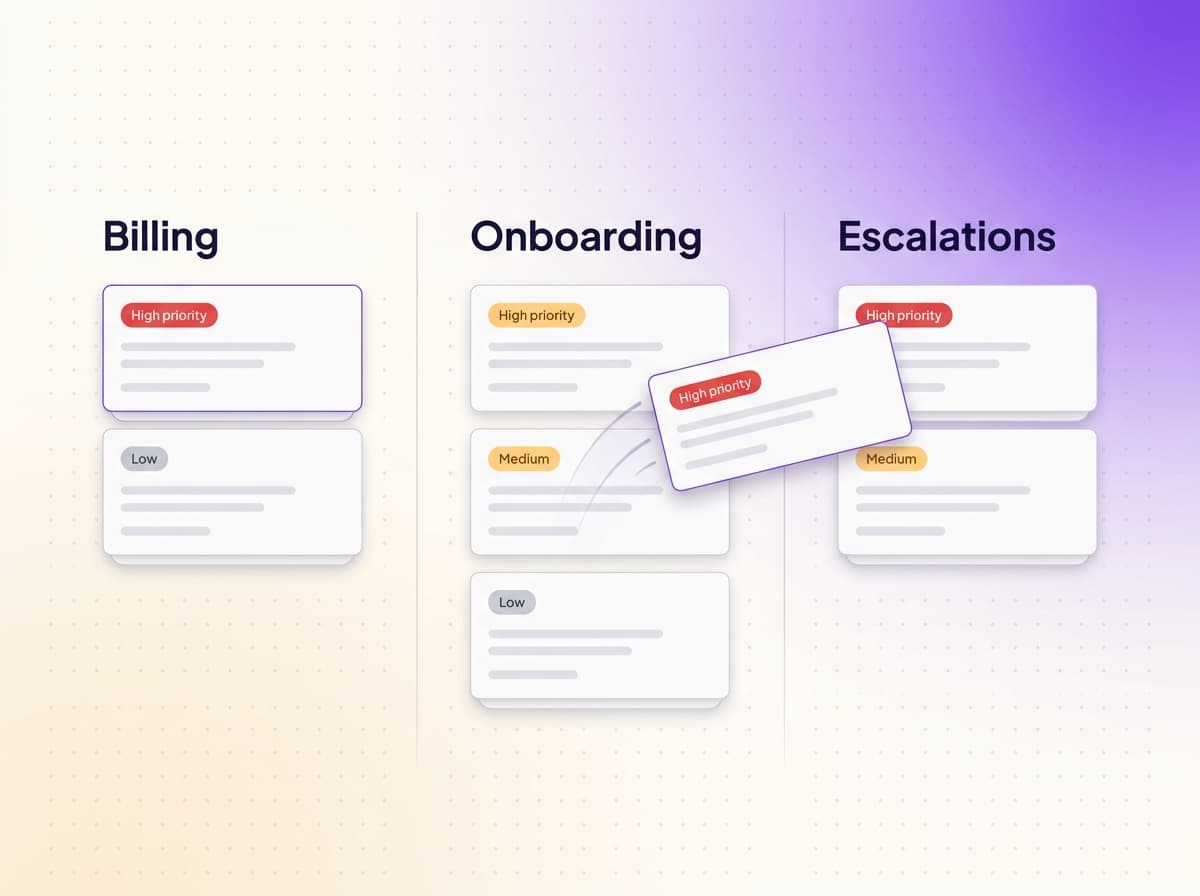
How does Support.cc handle ticket triage?

Support.cc organizes incoming conversations into lanes — customizable swim-lanes such as Billing, Onboarding, or Escalations — and applies SLA timers to each. When a new email lands, the AI agent classifies the message, drops it into the correct lane, and stamps the priority based on rules your team configures. Conversations stay threaded across channels, so a reply email picks up the same ticket as the original chat message.

Lane assignments are reversible: a teammate can move a ticket to a different lane and the agent learns the correction for future routing. Built-in SLAs surface stalled tickets before a customer escalates, and breach alerts post to the inbox view your team is already watching.

Comparison

How Support.cc compares to traditional helpdesks

Three pricing models dominate the AI customer-support category. Support.cc is the third path.

CapabilitySupport.ccTraditional helpdesks
Zendesk, Freshdesk
AI add-ons
Fin, Forethought
Pricing modelPer inbound emailPer agent seat ($55–$132/agent/mo)Per resolution ($0.99–$2.00)
AI draftsBuilt-in, human-approvedAdd-on, ~$50/agent/mo extraBuilt into the AI agent
Email connectionNative IMAP/SMTP + OAuthOAuthSits on top of your helpdesk
Knowledge basePublic help center includedSeparate productReads from your existing KB
Setup time~4 minutesDays to weeksHours
Branding controlYes from $29/moYes from $79+/agent/moInherits helpdesk branding
AI training on your dataNo, by policyVaries — opt-out requiredVaries
FAQ

Frequently asked questions

Buyer questions we hear most often. Pricing-specific questions live on the pricing page.

What makes Support.cc different from Zendesk or Intercom?

Support.cc prices per inbound email instead of per support agent, so adding teammates is free. AI drafts are built into the core inbox — not a paid add-on. Setup runs through a four-step wizard and takes about four minutes; traditional helpdesks take days to configure.

Do I need to migrate off my existing helpdesk to use Support.cc?

No. Support.cc connects to your support inbox directly over IMAP/SMTP or OAuth and runs alongside whatever you already use. If you want to fully migrate, we can import your knowledge base articles and historical tickets — talk to migration support.

Does the AI agent send replies autonomously?

No. Every AI-drafted reply is reviewed and approved by a human before it's sent to the customer. You can opt into autonomous send for narrow low-risk lanes (for example, order-status lookups), but it's off by default for every account.

How accurate are the AI drafts?

Customers using AI-assisted replies see up to 84% auto-resolution on high-volume lanes and a 42-second median time from inbox-open to reply-sent. Accuracy improves over time because every accepted human edit is recorded and used to refine future drafts.

Can I customize the agent's tone of voice?

Yes. The agent is trained on your past replies and knowledge base, so it inherits your house style automatically. You can also set explicit tone rules — for example, "Always reply in a friendly, professional tone" — that the agent applies to every draft.

Does Support.cc support multilingual replies?

Yes. The agent detects the inbound message language and drafts the reply in the same language. Multilingual knowledge bases are supported, and the human reviewer sees both the customer's message and the draft in the original language.

What channels are supported?

Email today, via Gmail, Google Workspace, Outlook, Microsoft 365, or any IMAP/SMTP server. WhatsApp is on the Starter and Growth plans (in rollout). Other channels are on the roadmap and gated behind the Growth plan.

Is my customer data used to train AI models?

No. By policy, Support.cc does not use customer data to train any AI/ML model. The agent uses retrieval-augmented generation over your knowledge base on every reply — it does not learn from your messages between sessions in a way that affects other tenants.

Ready when you are

Turn your inbox into a support engine

Free to start. No credit card. Live in minutes.

Talk to us
Support.cc
Support.cc

Support AI Agents that scale with you. Ticketing, AI drafts, knowledge base, and analytics — one workspace.

Product

  • Features
  • Pricing

Company

  • About
  • Contact

Legal

  • Privacy Policy
  • Terms of Service

© 2026 Support.cc.

All rights reserved.